This is another work-in-progress, so keep an eye out for updates.
Studs
You can set options for your stud on his page, via “Set Stud Options”. You can only set the stud fee pre-breeding season, or on retirement (if you retire him to stud mid-year). You can change the number of mares allowed anytime, but note that this will not remove any existing bookings, just prevent new ones (if you’re lowering the limits).
Options:
- Outside mare limit - this is the total number of mares not owned/leased by you that are allowed to breed this year. So if you want 10 bookings for yourself, set this to 20.
- Outside mares per stable - this is the limit per stable that can book. If you don’t care how many mares someone books, set this equal to the outside mare limit. Otherwise set it to whatever you like.
- Require approval to breed - same as the old system - if set, this will not let mare owners pick their own breedings and proceed with them. You will get notified and have to approve the breeding before it can proceed.
- Breed to FF-owned mares - this is a fallback option in case your stud doesn’t fill his book (or he does, but the mare owners don’t do the breedings). The game will automatically pick mares to breed to his empty slots after the dates have passed (to give you and/or mare owners the max time to use the slot themselves).
Bookings Tab: This is where you manage your stud’s bookings
- It will show you all the slots available for your stud (taking into account when he last raced, if you retired him mid-year)
- If a mare and/or stable are approved for a slot, you will see their info. If the mare is bred, it shows her due date.
- If the slot was missed (e.g. the mare owner didn’t do the breeding on time), you will see that.
- If the slot is not yet missed (e.g. the mare owner still has time to breed), you will see that.
- For slots that have no mare booked and are not in the past, you can use the Create Booking button to assign a stable and/or mare. If you want to give a stable an open slot (e.g. they can pick which mare to use), don’t select a mare. Otherwise, you can pick a mare. You can also optionally adjust the fee for the breeding.
Stuff that needs doing:
Allow modification of bookingsAllow deletion of bookingsAllow approval of pending bookings (if your stud is set to require approval)- Re-create script to do the FF mare breedings
- Figure out a nice way to do bulk bookings (input welcome, will expand below)
Add info to stable page re: stud bookings (or maybe notifications? Could make this a preference, I suppose)
Mares
This is super basic right now, I just wanted to get the buttons in so that I don’t have to wrestle with the old code to let people breed with their existing bookings.
If in foal:
- No Breeding tab will appear
- Foal due date shows up on her main page, as well as her foals list (and in your My Horses list)
If not in foal:
- Breeding dates will be displayed (if you retired her mid-year)
- Existing bookings (done via the stud’s side) will appear. If the mare needs shipping, you can click the “Ship to x” button to ship her to the stud’s stable. If she’s in transit, it will say so. If she’s already arrived at the stud’s stable, and the breeding date is valid (e.g. it’s not in the past), you will see the Breed button. You can select a day (within the range for the slot, e.g. May 16-31) and click Breed. This will move the mare into the “in foal” section outlined above.
Stuff that needs doing:
Let you pick your own bookings (for non-approval studs)Let you request bookings (for approval studs)Let you delete pending bookingsAdd info to stable page re: mare bookings (or maybe notifications? Could make this a preference, I suppose)
Mare booking to non-approved studs is live. 
On the mare's page, click Breeding
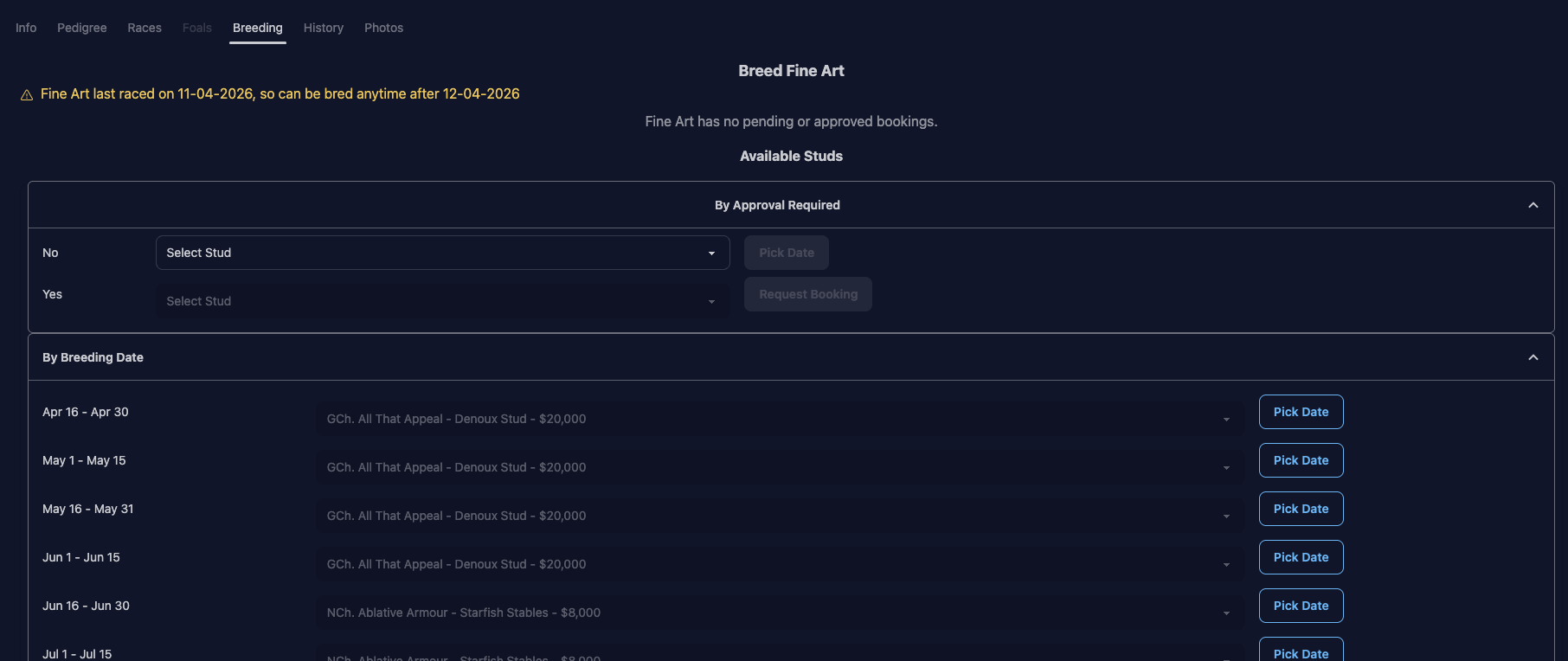
Any bookings for the mare will show here, as well as info on when the mare can be bred.
In the first dropdown, pick a non-approval stud
The “first dropdown” being the first one on the page, next to “No” under “By Approval Required”
When you select a stud, the Pick Date button will be enabled.

Click Pick Date
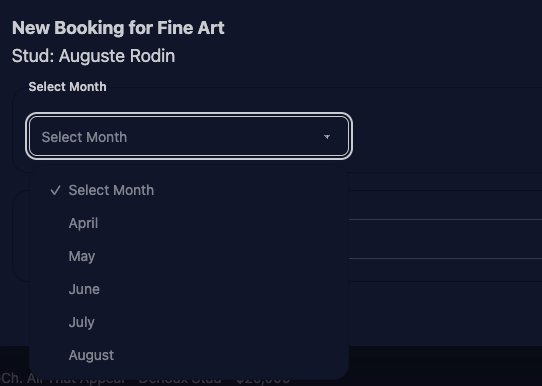
It will show the list of month(s) available for the stud that match the mare’s minimum breed date (or today, if the mare has no minimum date)
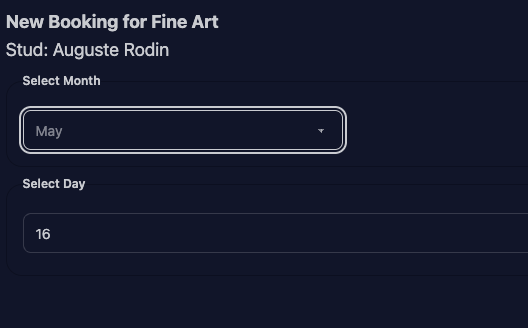
After picking a month
The list of days available for that month will be shown, again taking into account the mare (+ stud) minimum dates, as well as the stud’s bookings. In this case, Auguste Rodin’s May 1-15 slots are both full, so it’s showing May 16-31 days to pick.
Successful booking
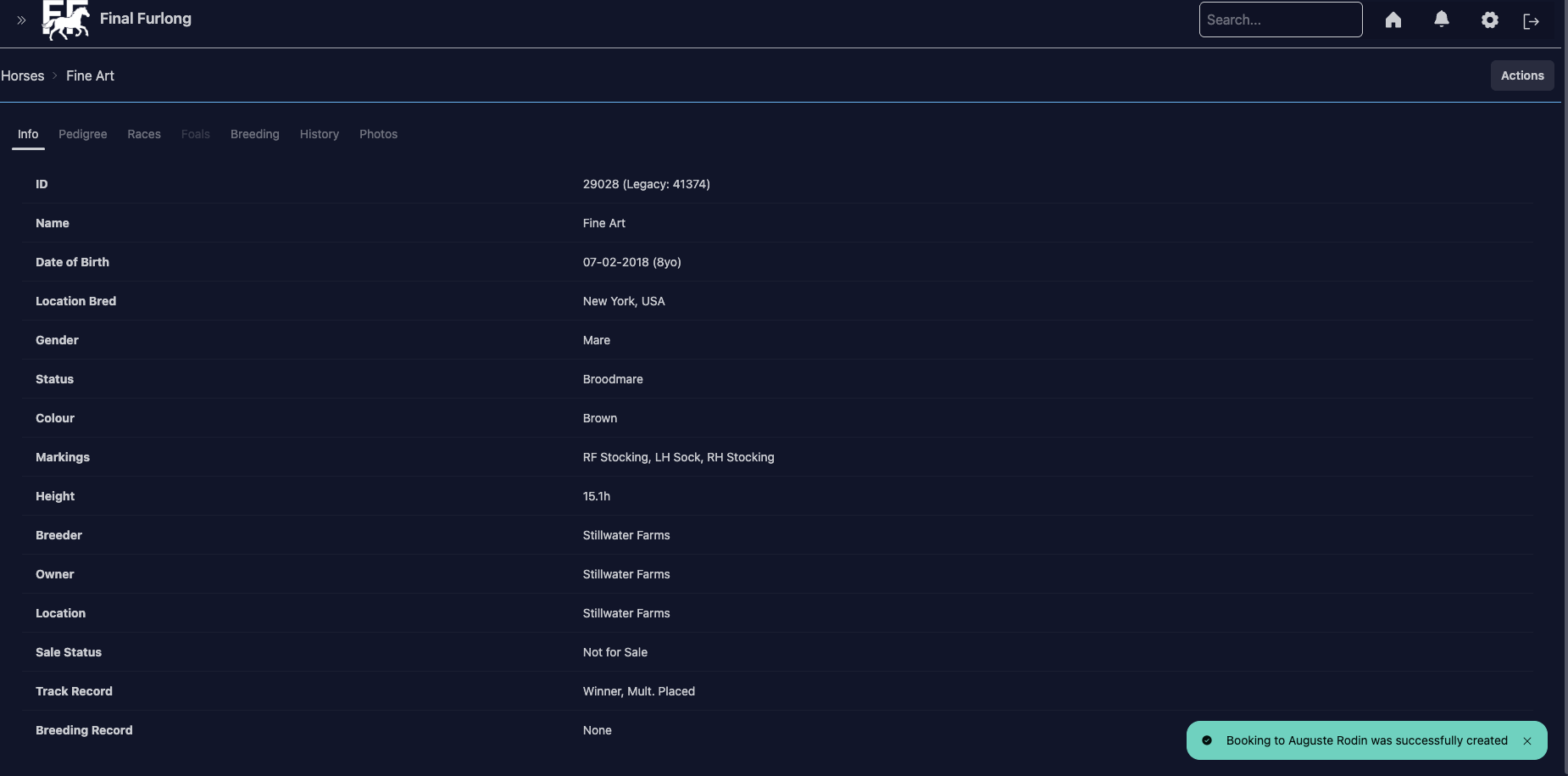
You’ll see a success message when you’ve created the booking. Note that just the booking has been created, the mare has not been bred.

1 Like
Stud + mare owners can now delete bookings (provided the mare hasn’t been bred).
Another feature that is looking really nice! I just used it, but I think I ran into a small bug:
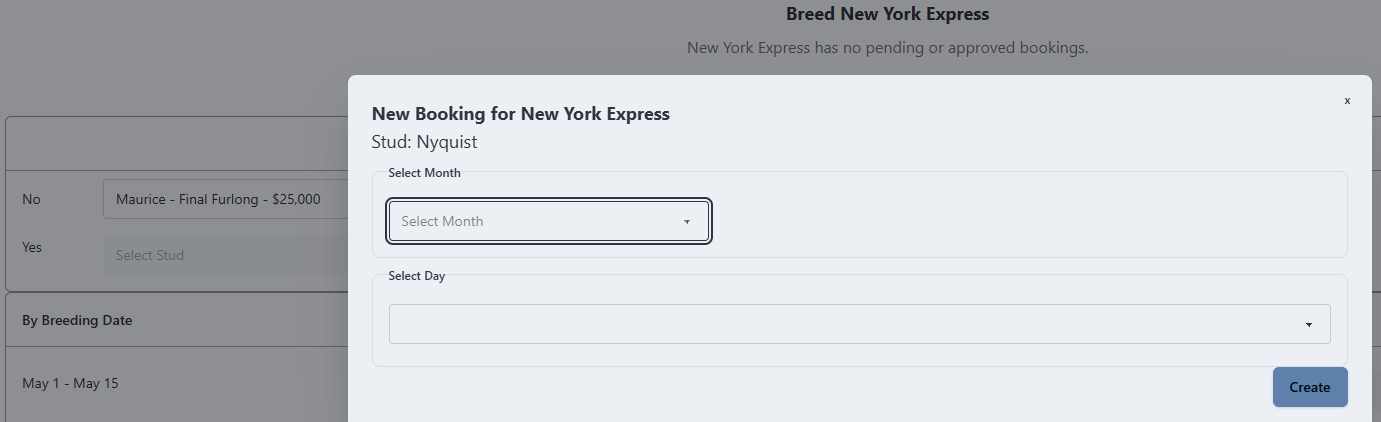
When selecting a stallion and clicking ‘pick date’ the pop-up comes up. But when you then go back to look at another stud the popup keeps bringing up the first one. So as an example in the screenshot, I had looked at Nyquist, x-ed the popup and then looked at Maurice. But the popup doesn’t open for Maurice but still for Nyquist.
I was so confused when all stallion I looked at only had July-August slots before I picked up on this. Refreshing the page works, but you can’t just go looking through studs without it.
Something you may need to check Shanthi
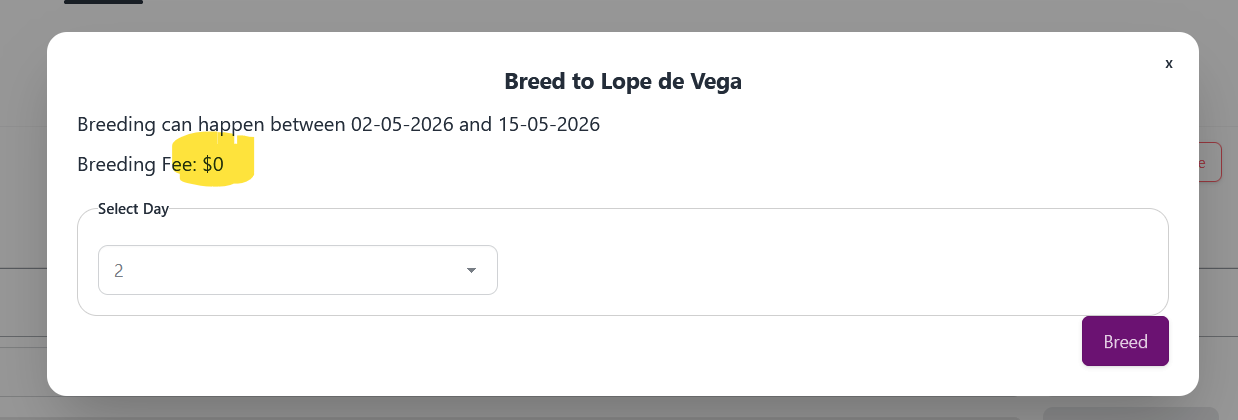
I think it’s the second breeding where the fee has appeared as $0 when it shouldn’t be.
What stud are you breeding to?
Screenshot says Lope de Vega 
Yes, fair point, I guess I meant what mare. 
It was Gin’Tak but I have bred her.
I’ve got heaps more that need breeding if you need a guinea pig?
Should be fixed.
1 Like
Stud owners can modify bookings. Note that you can’t change slots for a booking yet, I’m debating whether to include it in the current update action (more complicated) or make it its own thing (less complicated, but more buttons to press). Input welcome, especially if you do a lot of booking modification.
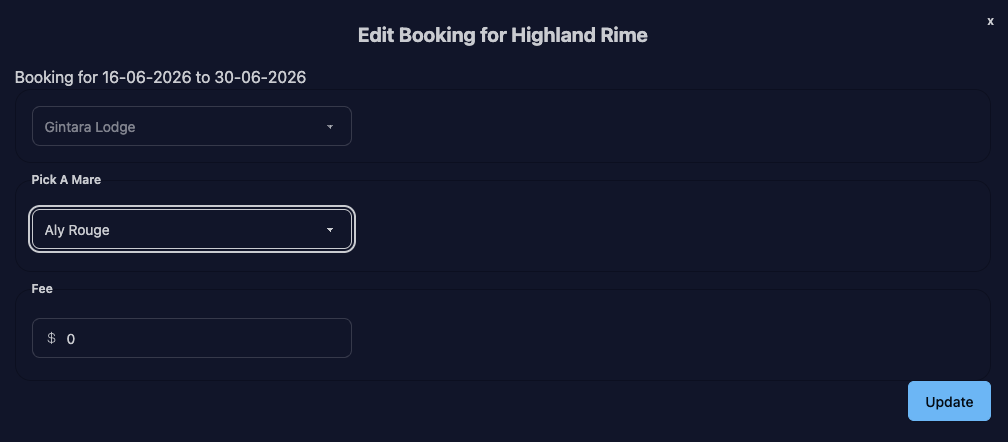
The stud fee should automatically update based on the stable you select. If it’s your stable, stud fee should set to $0, otherwise it should set to the stud’s current fee. (This only happens when you’re changing stables, so if you’ve offered Stable X a discounted booking and change mares for that stable, their discount should remain.)
@Andy you’ve been my guinea pig for screenshots, but this is all my local coding copy of the database, so don’t be concerned about HR’s bookings.
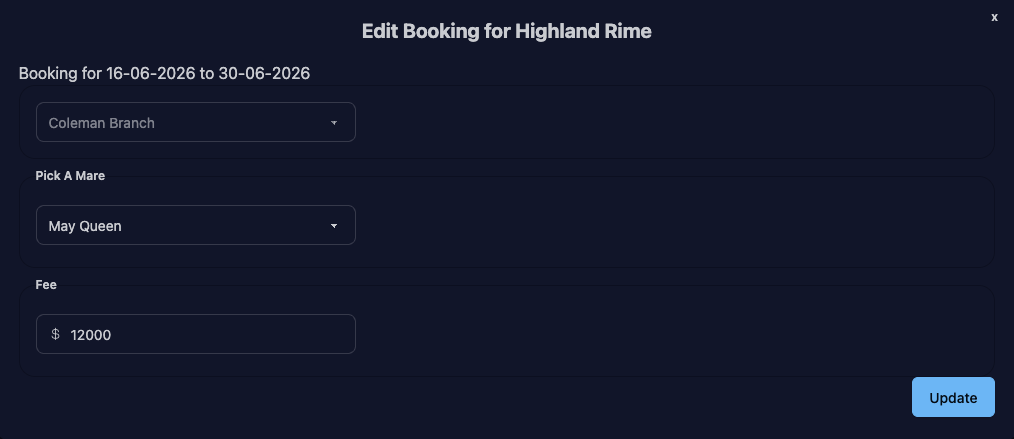
You can use the “Update” button next to a slot to change it

Notice that May Queen’s 12k fee is pre-populated in the form, and doesn’t change if you pick a different mare from Coleman Branch
If you change to Gintara Lodge (owner of the stud), the fee changes to 0
I hope to tackle moving slots soon, but for now, delete/create to shift a mare to a different slot.
1 Like
FYI unbred mares are now listed on your stable page. As well as the number of foals you have due this year + the next due date.
2 Likes
Shanthi there maybe a glitch here, looks like I’ve had a few foal down over night but somehow I now have 136 not in foal 
I would have thought I’d have 15 or so?

Carbonated shows as unbred on my stable overview, but there’s no option to breed her.
Should be fixed - I accidentally updated the logic to only count mares as bred if they were in foal for next year, so any mares still due this year were flagged as unbred.
2 Likes
Thanks Shanthi - I was worried we’d ‘unbred’ a few and I’ve have to remember where I’d sent them 
1 Like
Approved booking flow is live. All of the dropdowns for booking a mare are now live.
The "Yes" list of studs under "By Approval Status" now lists studs
Stud owners: If your studs require approval, they’ll appear for your mares in the “No” list because obviously you do not need to approve your own mares.
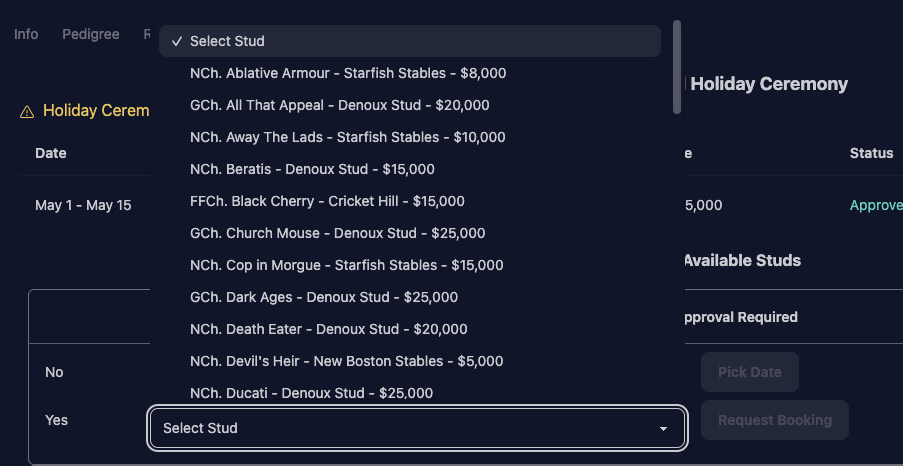
Selecting a stud enables the Request Booking button

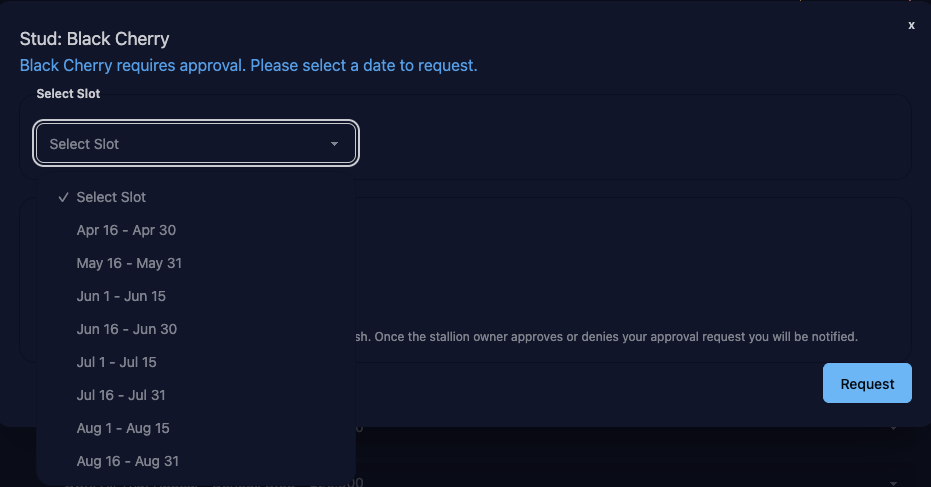
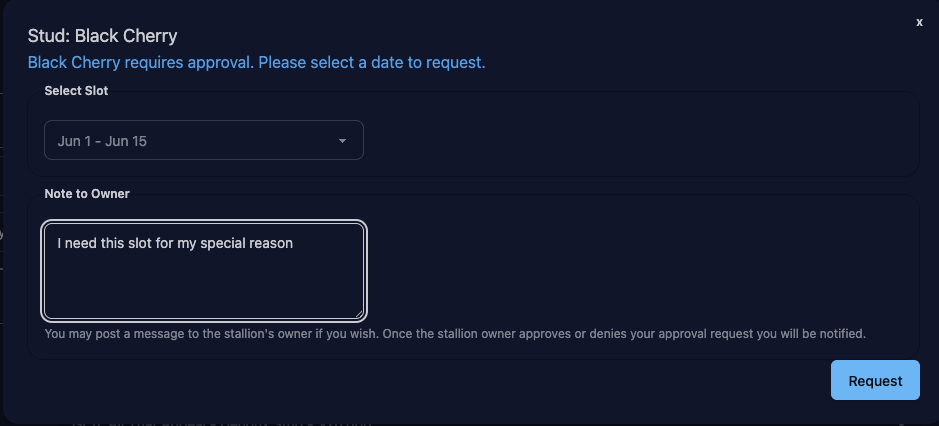
After submitting the form, the booking will show up as Pending on the mare's page

Stud Owner will get a notification
Note that it includes my super special reason for why I want the breeding.

Bookings header gets updated for the stud to show pending count

Mares will be listed with options to approve or deny

Booking display if slot could be overbooked

This counts bookings that have been bred, approved, or pending. In this case there are 3 pending bookings for a slot (and only 2 are allowed). Any of the 3 can be approved, but once 2 have been approved the 3rd can only be denied (until I add slot moving)

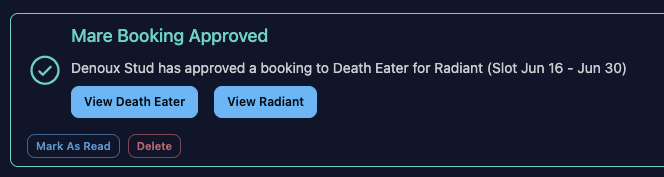


I think that’s everything. Please note that the code for this is a bit wonky, so I’ll be tweaking it over the next few days to stabilise it. If you get a 500, or a weird-looking page, try re-loading the mare’s page and make sure things look OK. (Stud pages seem fine, but obviously shout if anything is weird.)
3 Likes
For the unbred mares list is it possible to add back the Booking Pending/Approved and the In Transit line back, definitely helps me keep track of who I need to go back and click “Breed”
2 Likes